Working on it any questions regarding this subject please mail at Unofficialnios[AT]gmail.com
E-services
You can use e-services to change, edit and add information. Basically this saves your butt if you screwed up!
How does this work?
You select the service you want apply for attach documents and pay the fees. Your RC will verify it then forward it to SSS they will confirm it.
Basic details change/Correction
- Name change/correction (Including student, guardian and parents)
Study Centre Change Request Guide!
(click the button to open)
📘 Inactive study centre, Change Study centre!.
How to Change Your Study Centre (Simple Explanation)
If you want to change your study centre, it usually happens for one main reason: your current study centre is inactive or asking for a bribe!.
This means:
- You selected the study centre at the time of admission
- But now, when you called or visited them, they told you they are no longer affiliated with NIOS
- or bribe case
TBH, you don’t need to lose your mind if your NIOS study centre is INACTIVE
Here’s why:
- If your study centre is inactive, the NIOS system automatically updates your details for practical exams
- When the practical exam schedule is released, the system assigns a new practical centre on your hall ticket
- The new centre is usually near your location, within the same district
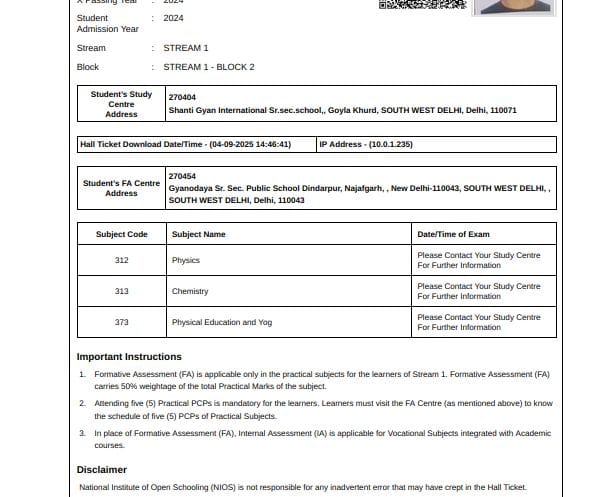
- Your practical hall ticket which comes 1 week before practical exam will clearly show:
- The new practical centre
- Practical exam date and details
This works as a built-in safety mechanism, so students are not affected even if the original study centre is no longer active.
So if you’re thinking, “What will happen to my exam?” — here’s the simple answer:
- Your practical exam will automatically shift to a new centre
- All updated details will appear on your new practical hall ticket
Below is an example showing how it looks on the ticket.
 ---
--- Okay, but what about my TMA marks?
- You just need to upload your TMAs properly
- The study centre being inactive does not affect TMA evaluation
- NIOS HQ or RC will automatically give TMA marks on your result!
Still want to change the study centre?
If you still want to change your study centre yourself, you can do that.
Below are the tools and step-by-step instructions you need to follow to apply for a study centre change.
You can either visit your Regional centre to change your study centre or do this, both are the same thing!
Study Centre Change Request Guide!?
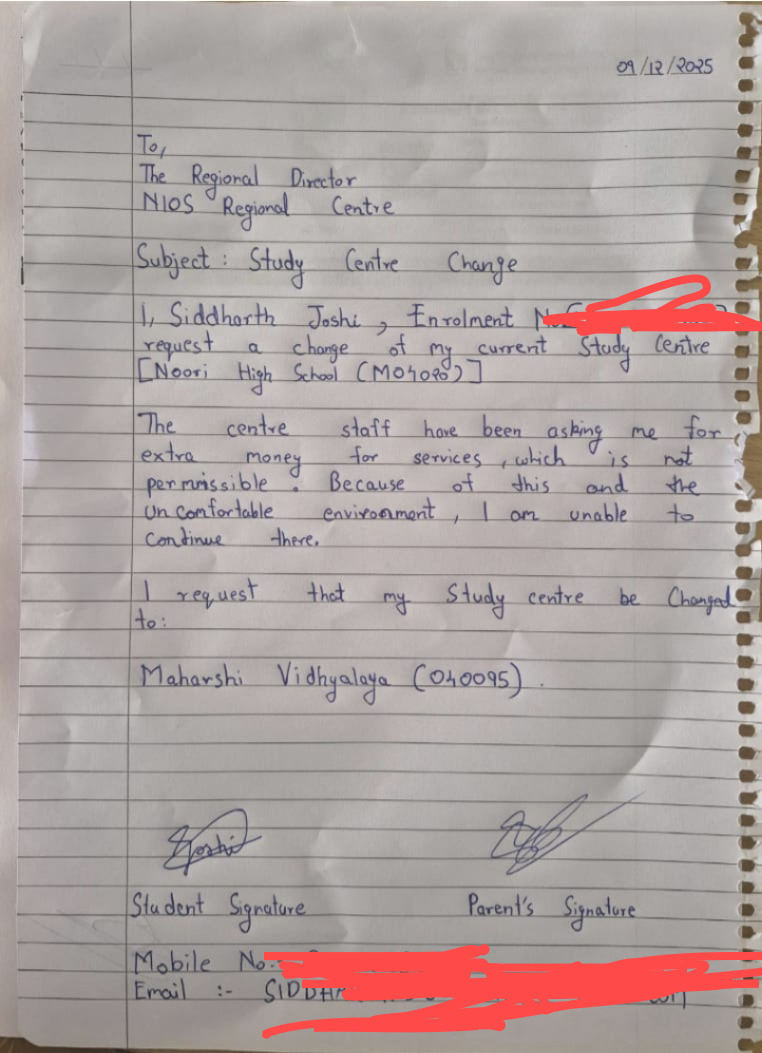
1. Write a self-declaration letter (handwritten)
- Address it to NIOS Headquarters and your NIOS Regional Centre
- Mention:
- Your name
- Your enrolment number
- Subject:
Request to change study centre as the current one is inactive
2. Write the body (keep it short: 2–3 lines)
You visited or contacted your current study centre
They / Principle informed you that they are inactive / no longer affiliated with NIOS
Due to this, you want to change your study centre
Mention the new study centre you want to shift to
just chat gpt the format bro
### Click Here is one Self-Decl.. letter Example
3. Choose the new study centre carefully
- Make sure the study centre is active
- Confirm it is currently affiliated with NIOS
- Do not repeat the same mistake How to do it? Here is the NIOS SC portal! - https://sdmis.nios.ac.in/registration/locate-study-center
4. Complete the self-declaration
- Write your name
- Add your signature at the end
5. Apply through e-Services
- Go to the NIOS e-Services portal
- Apply for Change of Study Centre
- Upload:
- Your handwritten self-declaration
- Your Aadhaar card
- Merge both documents into one single image before uploading
Small tip: After applying for a change, also email lsc@nios.ac.in and your Regional Centrethat you applied for this, attach your payment receipt. And Please approve this request!
That’s it. Follow the steps properly, and the request should go through without issues and will be confirmed in week or 2. ``
NIOS 12th Admission Issue: Picked Part Admission "Yes" and Previous qualification "12th Passed" by Mistake (How to Fix It)!
📘 12th Part Admission "Yes", Previous qualtifical "12th" and TOC issue (How to Fix Guide)!.
You wanted to take admission in NIOS 12th as a fresher with 5 subjects, but you picked these options
Part Admission = YES + Previous Qualification = 12th Passed or Opted for TOC too as a 12th passed student when you TOC option is only for failed students and now you only have 3 or 4 subjects max!
So first, understand the mess you are in:
- The Part Admission option is meant for people who are already 12th passed and later in life want to add 1 or 2 subjects (like Maths, Physics, etc.) for things like pilot programs, navy, or similar requirements.
- TOC option is for failed students, not for passed students!
What went wrong
You took admission in NIOS without properly reading how it works or which stream/option is meant for what purpose, and now you’re panicking and blaming NIOS for your mistake.
Let’s be clear: Yeah — you messed up. Hard.
But relax. This mistake can be fixed, if you follow the steps carefully from here. No more random clicks. No more dumb moves.
There are 2 cases, so the solution for each is different
(click button to open)
📘 CASE 1 - Part admission "Yes", Previous qualification "12th", but NO TOC!.
Case 1
You applied for Class 12 admission and selected:
- Previous Qualification: 12th Passed
- Part Admission: YES
- No TOC, no TOC
Check your NIOS dashboard → Application Status, you will see:
- these two options
👉 Good news: you are still safe. This setup can be reversed, and fast.
✅ Solution (Follow carefully)
Step 1: Change Previous Qualification
- Log in to your NIOS account
- Go to e-Services
- Apply for Previous Qualification Change
- Change:
- From 12th Passed
- To 10th Passed
Document to upload (important)
Write a simple handwritten letter. Content like this:
To NIOS Headquarters and Regional Centre
Name: Your Name Enrollment No: Your Enrollment Number
Dear Sir/Madam, I am applying for a previous qualification change from 12th passed to 10th passed, and for changing Part Admission from YES to NO in my NIOS account. This was done due to my mistake while taking admission. I want to correct it so that I can take 5 subjects and make a full admission in NIOS. Please kindly approve my request and help me correct my mistake.
Thank you Signature
- Merge this handwritten letter + Aadhaar card into one image
- Upload it as proof
Step 2: Change Part Admission to NO
- Again go to e-Services
- Apply for Part Admission Change
- Change:
- From YES
- To NO
- Upload the same merged document (letter + Aadhaar)
If by chance the Part Admission window is not working, like not opening then do this or if working the go to step 3
- Email these together:
- Your LSC
- Your Regional Centre
- NIOS (Dir/Support)
- Clearly mention that the Part Admission change option is not working
Step 3: NOW wait (don’t panic)
- This whole thing will take 2 to 3 weeks! so wait , fking wait
- Eservice thing is a 2-step process:
- First: your request is verified (accepted)
- Then: it is approved / confirmed (changes are applied)
- Keep checking:
- A notification in your dashboard
- Or the values will change directly
Pro tip: Once you’ve applied for everything, you can also politely email your LSC / RC with your details and payment slip to speed up the approval process. Do not spam.
🔴 Important Final Step 4 (Most people forget this)
Once both changes are approved and visible:
- Go to e-Services
- Add 1 or 2 subjects (to make a total of 5 subjects)
- Subjects get added almost instantly (1–2 minutes)
💸 Fees Breakdown
- Previous Qualification Change: ₹200
- Part Admission Change: ₹200
- Add Subject: ₹940 per subject
✅ Final Result
And that’s it — now you are done. You now have 5 subjects in NIOS, only if you did everything properly.
- Full admission restored
- 5 subjects allowed
- You’re back on track
That’s it. You messed up — but you’re saved if you do this properly.
📘 CASE 2 - Part admission "Yes", Previous qualification "12th", and Opted for TOC too!.
Nothing here rn, still working on it, don't have support nor any motivation to write this
``